
Table of contents
What is Programmatic SEO?
Programmatic SEO is a way to generate large volumes of pages at scale using templates and structured data, rather than creating them manually. So, programmatic content usually shares the same structure in page layout, URL slug, headings, CTA, imagery, etc.
Programmatic SEO examples
Programmatic SEO can be applied across content topics to scale content.
- Glossary, e.g. Definition of {Code/Term} as educational content
- Comparison & Alternative, e.g. Your product vs {Competitor} or Best {Competitor} alternatives for consideration or purchase intent
- Template, e.g. {Task} template, like a customer satisfaction survey template and a resume template
- Integration marketplace, e.g. {Product} + {Tool} integration like Salesforce + DocuSign Integration and Salesforce + Jira Integration
- Tool, e.g. Free {task} tool like free keyword research tool, free traffic tracker and free backlink checker
- Best/Top listicle, e.g. 10 sad romance movies, top 20 beauty influencers in London
Why use Programmatic SEO?
Scale content with less effort
You can build hundreds of unique and high-quality pages in a disciplined way by running the preset template without creating them manually from scratch, saving you time and effort. But, I’d avoid “build all overnight”, which may be risky and look spammy in search engines’ eyes.
Drive compounding growth
When tying programmatic content with product capabilities, you can drive more users to experience your product, turning high-intent traffic into conversions. For example, sending people to try your templates natively on the platform (not a downloadable asset), giving them a logged-out product experience.
Optimize in bulk
Whenever updates are needed, they can be applied across the board to instantly improve performance.
How to do Programmatic SEO: Tools + Real example
Industry type: Mental Health SaaS
Programmatic content topic: Medical ICD-10 coding (Therapists need to document patients’ medical conditions as diagnostic codes in the sessions)
Tools used: WordPress, “WP All Import” plugin, Ahrefs, Google Sheets (+Apps Script) and OpenAI API.
No. of pages & traffic: 100-120 (~30% of total traffic)
TL;DR: I helped this company scale high-intent traffic by building a programmatic content system for medical ICD-10 coding content. From keyword research to planning, building a database and pushing content to CMS, we generated 100-120 programmatic pages for these codes and managed to update content across the board on a scale.
Here’s how we did it step by step:
Step 1: Identified scalable, in-demand keyword patterns
Users searched for specific ICD-10 codes by name, like F33.2, F32.9, F90.0, F90.2, F43.10 and more. Each code had its own search demand, so we gave each one a dedicated page. Here’s a snapshot of the volume:
| Keyword group for each code | Search Volume (US only) |
| F33.2 ICD 10 + related KWs | 720 + SV from related KWs |
| F32.9 ICD 10 + related KWs | 260 + SV from related KWs |
| F90.0 ICD 10 + related KWs | 480 + SV from related KWs |
| F90.2 ICD 10 + related KWs | 480 + SV from related KWs |
| F43.10 ICD 10 + related KWs | 140 + SV from related KWs |
| Continue to add more… | … … |
Step 2: Planned the structure and content
Next, we mapped out what each ICD-10 page should cover:
- Key takeaways
- What does {Code} mean?
- Who uses {Code}?
- Similar code comparison: {Code X} vs {CodeY}
- Best practices when using {Code}, etc.
Then, how to generate the content – manual input, AI or hybrid? We decided to use a hybrid method so we could use AI to create unique content for each code at scale while we stay in control of the quality and direction.
Step 3: Built a database spreadsheet (Most important step)
We built a database in Google Sheets using the structure from Step 2. This spreadsheet was the backbone of the whole system. When it’s uploaded to WordPress, it generated pages at scale.
1/ In the Google Sheets, we added some columns for the necessary manual inputs (see Column A-B). These were the raw directions we gave the AI to generate content. (Simplified below for illustration)
| A | B | C | D | E | F |
| icd-code | condition_name | slug | seo_title | h1 | meta_description |
| F41.1 | Generalized Anxiety Disorder | ||||
| F41.0 | Panic Disorder |
2/ Then, we ran the embedded Apps Script, which called the OpenAI API. The core SEO fields (columns C–F) auto-populated based on my inputs.
Try my sample database here (with Apps Script embedded):
– Make a copy of my sample
– Go to ‘Extension’ > ‘Apps Script’ > ‘Project settings’ (gear icon)
– Add script property: Property: OPENAI_API_KEY / Value: Your actual OpenAI API key (starts with sk-…)
– Go back to ‘Editor’ (coding icon) > Click ‘Run’
– The rest of the columns auto-populate
| A | B | C | D | E | F |
| icd-code | condition_name | slug | seo_title | h1 | meta_description |
| F41.1 | Generalized Anxiety Disorder | generalized-anxiety-disorder-f41-1 | Understanding Generalized Anxiety Disorder (ICD F41.1) | Generalized Anxiety Disorder: ICD Code F41.1 | Explore Generalized Anxiety Disorder (ICD F41.1), its symtoms, diagnosis and best practices for mental health professionals. |
| F41.0 | Panic Disorder | panic-disorder-f410 | Understanding Panic Disorder (ICD F41.0) | Panic Disorder: ICD F41.0 | Learn about Panic Disorder (ICD F41.0), its symtoms, usage by mental health professionals, and best practices for diagnosis. |
3/ For the main content, we added a couple of blank output columns (Columns L-T). They also filled in automatically based on the manual inputs (Columns G-K) when the script ran. These output columns were what WordPress used to generate each page.
| G | H | I | J | K | L-T |
| key-takeaway_input | usage_notes | similar_codes | best_practice_input | mistakes_input | output |
| Understand what F41.1 is, who can use it, similar code comparison, best practices and mistakes to avoid | By mental health professionals | F41.0, F41.9 | Ensure diagnosis meets duration and severity criteria | Do not confuse with panic disorder or short-term anxiety | [Auto-Fill] |
| Understand what F41.0 is, who can use it, similar code comparison, best practices and mistakes to avoid | By mental health professionals and clinicians | F41.1, F41.9 | Confirm attacks are unexpected and recurrent | Do not confuse with generalized anxiety disorder or phobias | [Auto-Fill] |
4/ These two rows tested successfully. We continued adding the remaining ICD-10 codes from Step 1.
Step 4: Generated pages at scale
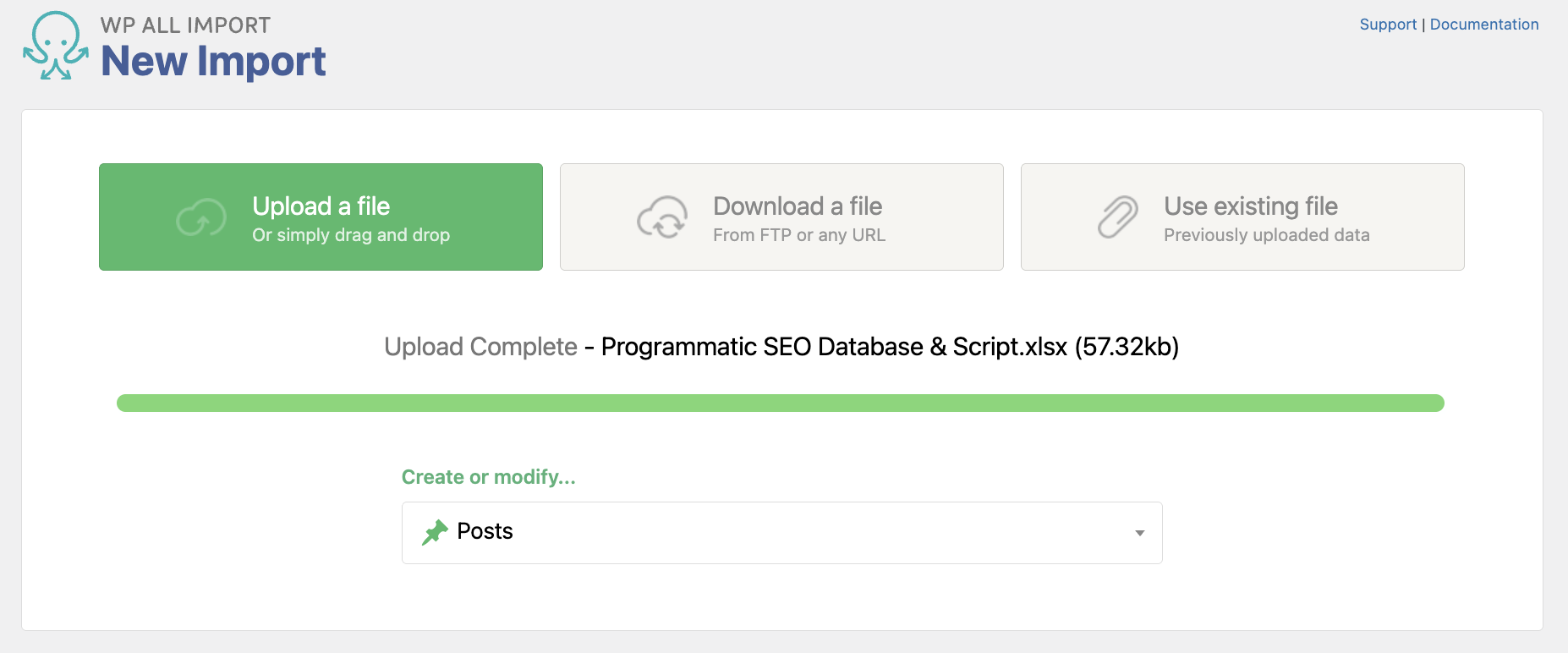
1/ After installing and activating the “WP All Import” plugin in WordPress, we uploaded the Google Sheets and selected “Create Posts”.
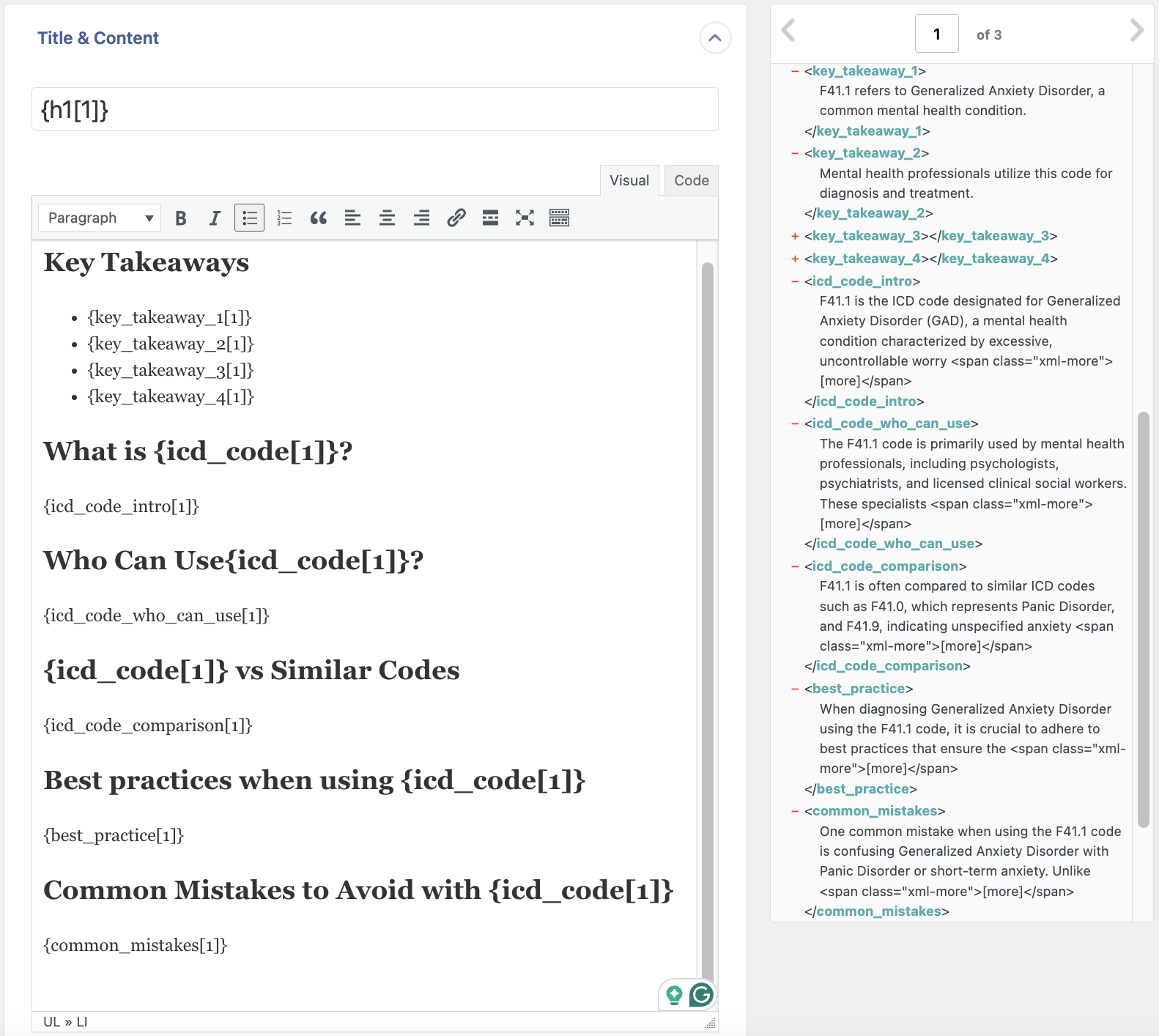
2/ Next up, the data from all columns was loaded in. By dragging and dropping, we executed the structure as planned in Step 2 and styled the post template using headings, sub-headings and bullet points [This was the template used across all ICD-10 code programmatic content]. We also previewed how all the posts looked before proceeding. In addition to the page structure, we configured these options in this template:
- SEO title, Meta description (Paid plan)
- URL slug
- Author
- Category/Tag
- Post status: Published or Draft
- Post dates
- Comments: Allowed or not
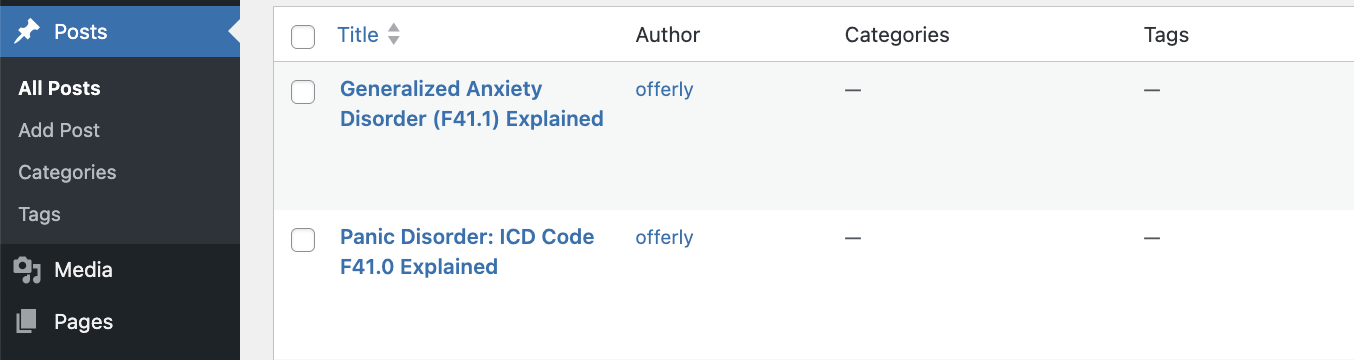
3/ By confirming and running, all posts were successfully created in draft.
Step 5: Added internal linking
While this could be done in the post template setup, the team manually connected pages once they saw internal linking opportunities to help users navigate and boost SEO.
Step 6: Tested and optimized in bulk
We also re-ran the template once to tweak the content at scale. In the future, we may add in product imagery to show how the product auto-computes the codes.
Best Practices & What to Avoid
- ✓ AI + Human control:
AI is great for speeding up things like research and drafting, but content that’s purely AI-generated feels flat and is likely neglected by Google (we’ve all seen this). The real value comes from layering in your own experience and opinions, making it useful and worth reading. - ✓ Product-led mindset:
I’m not a big fan of using pSEO just to build TOFU content like glossaries. Instead, focus on content that ties to user intent and business outcomes. Think along the lines of “Best Airbnb in {city}” or “Best {niche} movies on Netflix.” You’re helping users make decisions, leading to conversions. - ✓ Monitor closely:
There are plenty of pSEO cases going wrong, especially with low-value, highly repetitive or off-topic content. That’s where you start risking Google penalties. Roll out by phase and keep an eye on what’s getting indexed and what’s driving traffic. Optimize or even prune them if needed. - ✖ No vanity pages:
SEO in 2026 is no longer about writing a bunch of “What is” content and praying for Google to rank. SEO should be driving something meaningful, like sign-ups, demos, or revenue (It always should have, to be honest). - ✖ No repetitive, low-value pages:
A lot of pSEO ends up being the same with slight tweaks in URL, title and headings. Examples like “Marketing agencies in {city}” or “HR software for {industry}” are not uncommon. It’s worth asking if they actually add anything new for the user before starting. (Note: Wise is one of the exceptions. Their pSEO pages like “Send money from {country A} to {country B}” make sense because each serves a very specific need, even though their pages are very similar.) - ✖ No mindless scaling:
It’s easy to get caught up chasing search volume (been there), but more pages don’t always mean better results. Take something like construction software. Do you need separate pages for “Construction Project Management Software,” “Construction Project Execution Software,” and “Construction Project Tracking Software”?
Programmatic SEO case studies
Some SEO roles specifically ask for programmatic SEO skills or list them as a “nice-to-have.” The truth is, not every SEO pro gets hands-on with it because programmatic SEO isn’t a fit for every site. That’s why I’ve handpicked a few standout examples to show how different industries use this strategy ➜ Programmatic SEO case study
